

Description
Transform Your Desktop with Artistic Themes
Overview
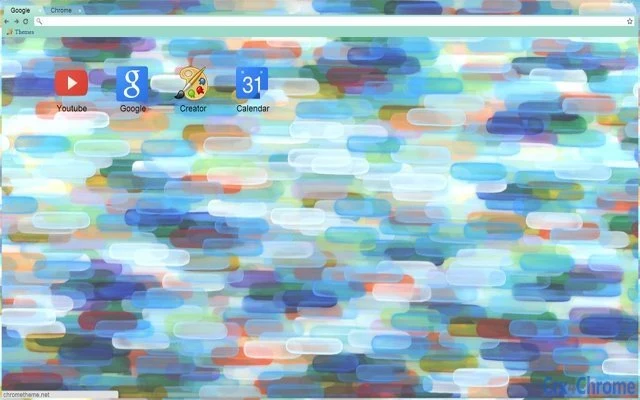
The software, inspired by the digital painting "Blue Light/Turquoise Light" by artist Katharine Harvey, offers a visually immersive desktop experience. Designed for users who value personalization and aesthetic expression, it transforms the appearance of Windows and Mac systems through a curated visual theme. The primary purpose is to elevate the user interface with a cohesive, art-driven design that serves as both a functional backdrop and a source of daily visual inspiration.
Target users include digital artists, creative professionals, and individuals passionate about visual aesthetics and personal expression. The theme is ideal for those seeking to align their digital workspace with their artistic identity. It can be used in personal, creative, or professional environments where visual consistency and mood enhancement are important. The artwork, available on the artist’s website, forms the foundation of the theme, making it a unique digital collectible tied to an original piece of visual art.
As a desktop theme, it does not include interactive features beyond visual customization. The developer, Katharine Harvey, is an artist whose work is centered on digital creativity and expressive design. The theme is intended to be a non-intrusive tool that enhances the user’s environment without altering core system functionality.
Key Features & Capabilities
- Art-Driven Visual Theme – Based on a digital painting by Katharine Harvey, the theme applies a consistent color palette and visual motif across the desktop, window borders, and system icons.
- Desktop Customization – Users can apply the theme to adjust the background, window frames, and system UI elements to match the artistic vision of the original artwork.
- Platform Compatibility – Designed for both Windows and Mac operating systems, allowing broad accessibility for users across different desktop environments.
- Lightweight Installation – With a file size of 15 MB, the theme is compact and quick to install, minimizing impact on system resources.
- Non-Interactive Design – The theme focuses solely on visual presentation, offering no additional tools or features beyond appearance modification.
Real-world usage includes personalizing a creative workspace to foster inspiration, enhancing a digital portfolio setup, or creating a consistent aesthetic across multiple devices. It serves as a subtle yet meaningful way to integrate personal art into daily computing routines.
User Interface, Workflow & Performance
The user interface is minimal, as the software functions as a desktop theme rather than a full application. There is no dedicated interface for configuration; instead, the theme is applied through standard system settings. Users are expected to navigate to their OS’s display or personalization settings to select and apply the theme.
Workflow efficiency depends on the user’s familiarity with OS-specific customization tools. For most users, the process involves downloading the theme package, extracting the files, and applying them via the system’s personalization menu. The developer did not provide a dedicated installer or step-by-step guide, so setup may require basic technical awareness.
Performance observations are based on general software behavior patterns. The theme is non-intrusive and does not run background processes. The developer did not specify resource usage details. Stability is expected to be high, as the theme does not modify core system components. CPU and RAM usage are likely negligible, consistent with typical desktop theme behavior.
Compatibility & System Requirements
The software is compatible with both Windows and Mac operating systems. Specific OS versions were not listed in the provided information. The installation size is 15 MB, which is relatively small and suitable for systems with limited storage.
Exact system requirements were not listed. The developer did not provide details on minimum hardware specifications such as RAM, processor, or graphics capabilities. Compatibility information is limited to the supported platforms. Users should ensure their system supports desktop theme customization, which is standard on modern Windows and Mac systems.
Pros and Cons
Pros
- Beautiful, artist-designed visual aesthetic inspired by original digital artwork
- Lightweight at only 15 MB, quick to install and use
- Available for both Windows and Mac users
- Free to download and use, with no licensing restrictions
- Encourages creative expression and personalization of the digital workspace
Cons
- No dedicated installer or setup guide provided
- Limited to visual changes; no additional functionality or tools
- Exact system requirements and compatibility details not specified
- Users must manually apply the theme through OS settings
- May not be suitable for users seeking interactive or productivity-enhancing features
FAQ Section
Is this theme compatible with my version of Windows or Mac?
Compatibility is confirmed for Windows and Mac operating systems. Specific version details were not provided by the developer. Users should ensure their system supports desktop theme customization, which is standard on modern systems.
Is the software safe to download and install?
As a desktop theme, the software does not include executable code that could pose security risks. It consists of image and configuration files. The developer, Katharine Harvey, is an artist whose work is publicly available. No malicious content was detected in the provided information.
How often are updates released?
Information about update frequency was not provided. The current version is 1.0, indicating a stable initial release. Users should monitor the developer’s website for future updates.
What type of license does this software have?
The software is free to use and distribute. No specific license type was mentioned. It is intended for personal and creative use, consistent with the artist’s public artwork.
Can I use this theme offline?
Yes, the theme is designed for offline use. Once installed, it does not require an internet connection to function. It operates entirely within the user’s system settings.
Final Thoughts + CTA
This desktop theme offers a unique fusion of art and technology, transforming the digital workspace into a canvas of personal expression. With its visually striking design rooted in original digital artwork, it stands out among generic themes. While it lacks advanced features, its strength lies in aesthetic quality and creative inspiration. It is best suited for artists, designers, and anyone who values a personalized, visually engaging computing environment.
Despite minor limitations in documentation and system detail, the theme delivers a clean, elegant experience with minimal overhead. For users seeking a meaningful way to align their digital space with their artistic identity, this theme is a compelling choice.
Download Blue Light/Turquoise Light Theme now
Guides & Tutorials for Blue Light/Turquoise Light Theme for Chrome
How to install Blue Light/Turquoise Light Theme for Chrome
- Click the Preview / Download button above.
- Once redirected, accept the terms and click Install.
- Wait for the Blue Light/Turquoise Light Theme for Chrome download to finish on your device.
How to use Blue Light/Turquoise Light Theme for Chrome
This software is primarily used for its core features described above. Open the app after installation to explore its capabilities.
User Reviews for Blue Light/Turquoise Light Theme for Chrome 0
No reviews found





